For shops, restaurants, pharmacies and every biashara
Your biashara deserves to be seen.
Sell at your counter with the DukaFiti till, and online to more customers. Take M-Pesa, keep stock right and grow your business.
No card needed to start. Set up in minutes on the phone or laptop you already have.
Point of sale
A till for selling at your shop counter
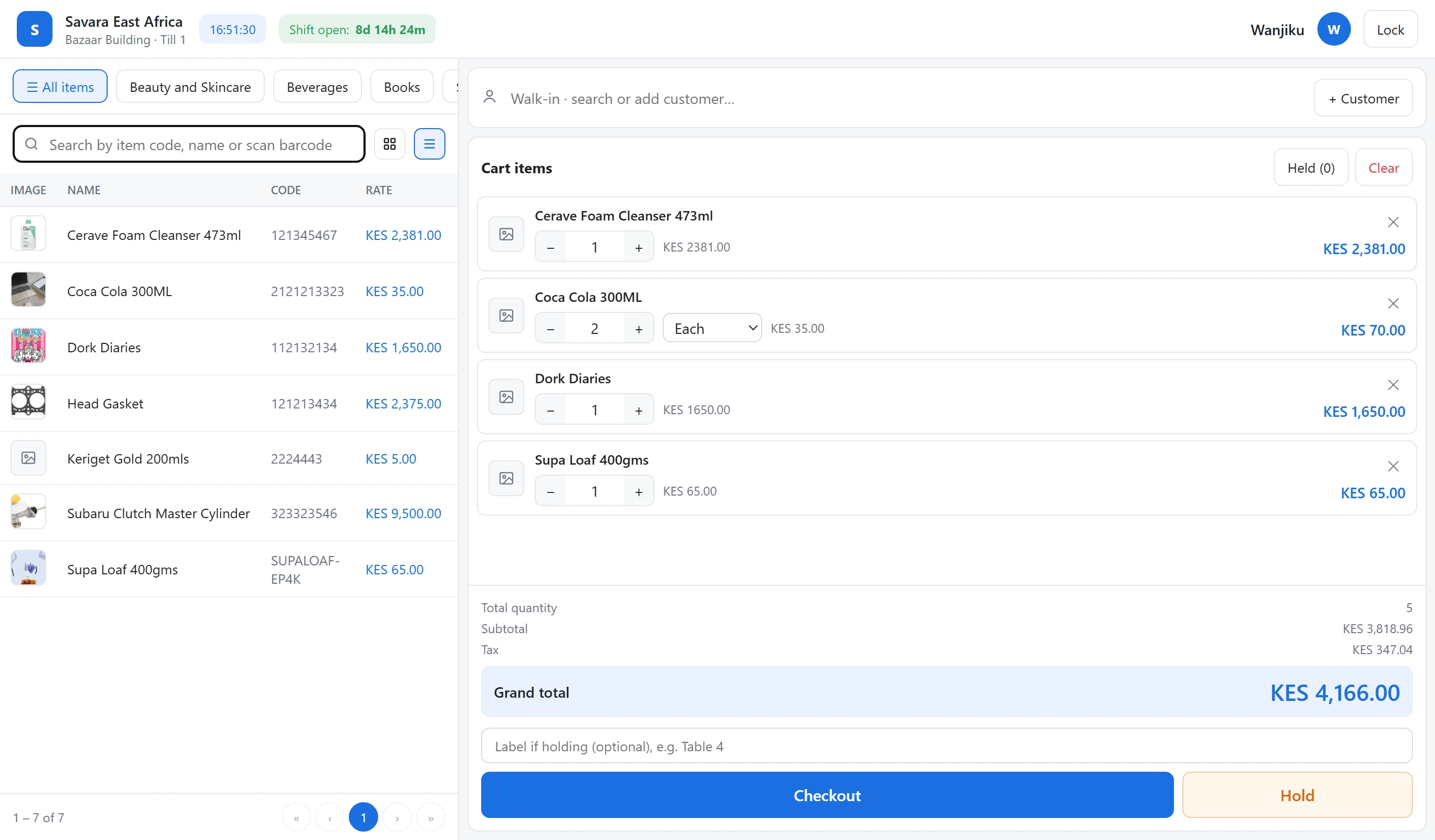
DukaFiti comes with a POS. Ring up sales in seconds, take cash or M-Pesa, and print the receipt, on the phone, tablet or laptop you already have.
- Scan or tap to sellScan a barcode, search by name or code, or tap an item. Change quantities and units in the cart.
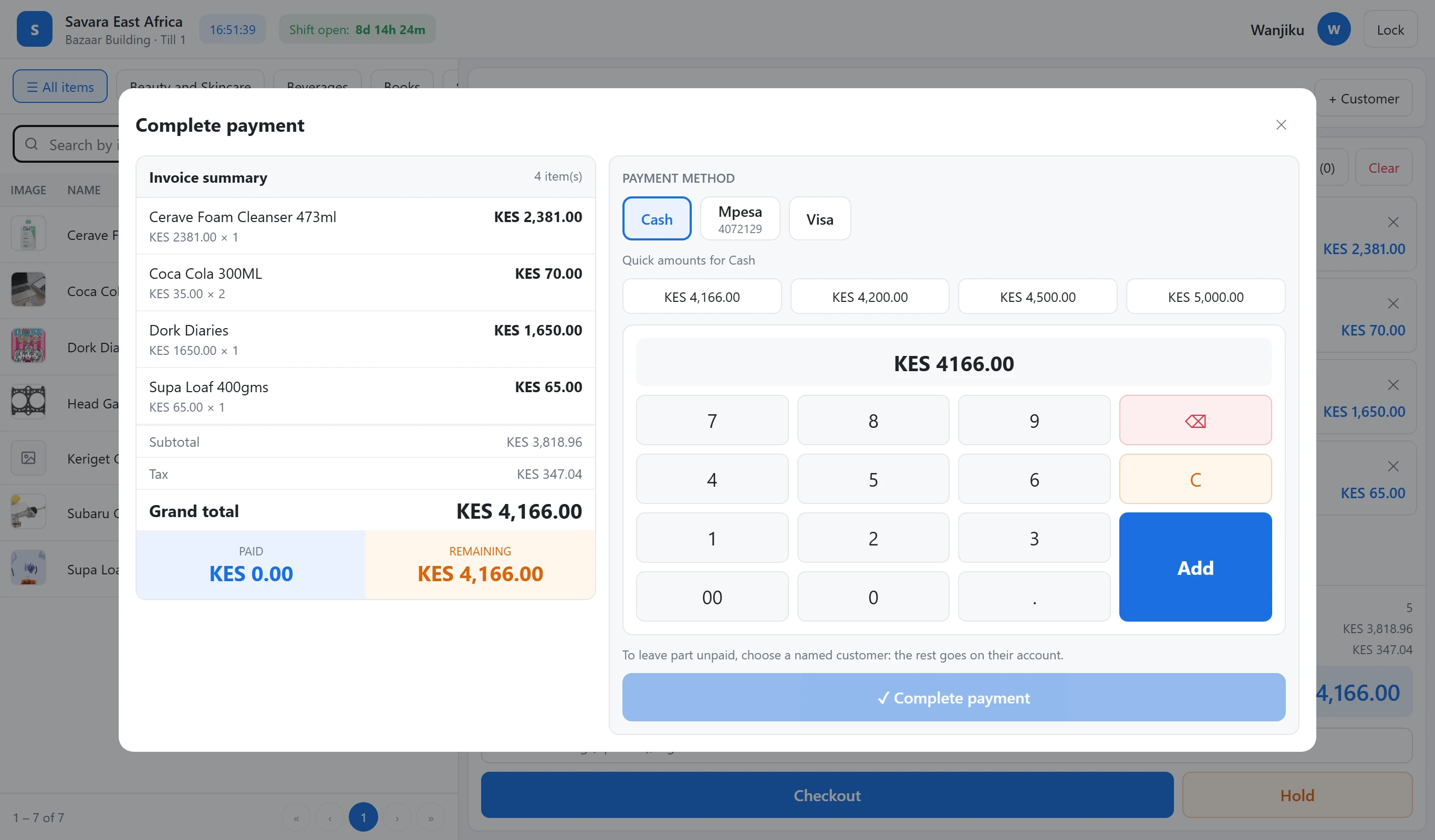
- Cash, M-Pesa and cardSend an M-Pesa prompt to the customer’s phone, take cash with quick amounts, or split one sale across methods.
- Customers and creditAttach a customer to a sale, use their prices, and leave part unpaid on their account.
- Hold, receipts and shiftsHold a sale for later, print or reprint receipts, and close each shift with a cash count.
- Promotions apply themselvesRunning offers show in the cart and the price drops automatically, at the till and online.
- Stock stays rightEvery sale updates stock, so your online listings show what you actually have.
Why sell on DukaFiti
Grow beyond the four walls of your shop
Everything you need to get found, sell and stay organised, in one place.
Reach more customers
Make your products discoverable to shoppers searching by category and town, beyond your physical shop.
Your own online shop
A shop page with your logo, products, location and contacts, ready to share with customers.
Real prices and stock
Listings come straight from your till, so shoppers see what you actually have and what it costs.
Direct customer connections
Shoppers call, WhatsApp or order from you directly. You confirm and serve them your way.
Manage your products
Create and update items, prices, units and stock, and choose exactly which ones go online.
Grow your business
Sell at the till and online, take M-Pesa, and see your sales and low stock at a glance.
Features
Everything to run your shop
Behind the till: your customers, your suppliers, your stock and your online orders, all in the same back office.
Customers & sales
- Manage your customers Accounts, groups with their own prices, balances, credit and statements.
- Manage suppliers Contacts, the items each one supplies and the last price you paid.
- Generate quotes Printable quotes with VAT, emailed as a PDF, valid until a date you set.
Marketplace orders
- Orders from DukaFiti Shoppers order from your store page; you get an email straight away.
- Confirm and fulfil Call, confirm, pick the branch, then mark it ready for pickup or out for delivery.
- Paid and recorded Take cash or M-Pesa; completed orders become sales and update stock.
Stock
- Receive stock Purchase orders to suppliers, received in full or in part, with costs updated.
- Transfer stock Move stock between outlets and warehouses, with shortages recorded.
- Batches and expiries Batch numbers and expiry dates, first-to-expire sold first, and a 30-day expiring-soon list.
Grow
- Promotions Reduced prices for a set period, at the till and online.
- Boost ads Pay to show your products more often in DukaFiti search.
- Special prices Available today: price lists for customer groups, and till discounts up to your limit.
How it works
From sign-up to your first online order
-
1
Create your account
Sign up with your email or Google account. It takes a minute.
-
2
Register your business
Add your business name and type. You start on the free Trial plan.
-
3
Set up your shop
Add your logo, towns, phone and WhatsApp in Marketplace settings.
-
4
Publish your products
Add items with photos and prices, then choose which ones to show online.
-
5
Receive customer orders
Shoppers call, WhatsApp or order. You get an email and confirm with them.
-
6
Get paid and grow
Take M-Pesa at the till or online, keep stock right and watch sales grow.
Runs on what you already have
Phone or tablet
Any device with a modern web browser. No special till to buy.
Laptop or desktop
Use the computer you have for the back office and the till.
Barcode scanners
USB or Bluetooth scanners that type like a keyboard just work.
Receipt printers
Print receipts, bills and labels through your browser.
Made for your kind of business

Retail shops
Sell faster, never run out of best sellers
Learn more
Restaurants & bars
From table to kitchen to bill, without the shouting
Learn more
Pharmacies
Batches, expiry dates and fast counter sales
Learn more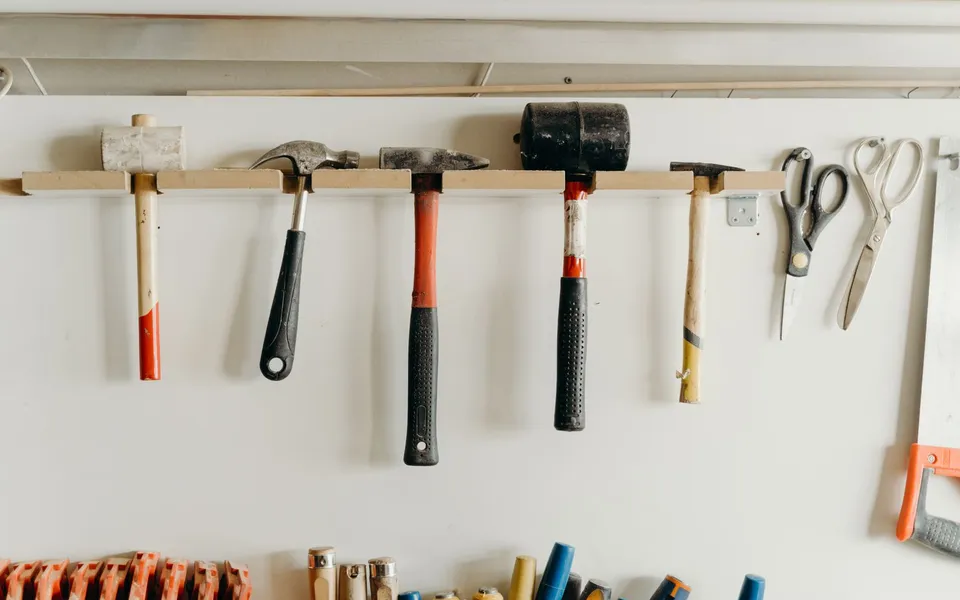
Hardware stores
Thousands of items, sold by the piece, metre or bag
Learn more
Clothing & fashion
Sizes, colours and quick exchanges
Learn moreSelling, payments and tax
Online marketplace
Choose which items to show on DukaFiti. Shoppers see your prices and whether you have stock, then call, WhatsApp, visit or order.
M-Pesa payments
Use your own M-Pesa till or paybill. Connect the M-Pesa API (Daraja) and the till sends the payment prompt to the customer's phone.
KRA & tax
DukaFiti works out VAT on every line, prints your KRA PIN on receipts and keeps the records you need for your returns.
Marketing
Get found on DukaFiti, share your store, and look after the customers you already have.
See it in action
Sample screens from DukaFiti.
| Item | Batch | Expires | Qty |
|---|---|---|---|
| Paracetamol 500mg | B2391 | in 12 days | 40 |
| Amoxicillin 250mg | A1180 | in 3 months | 120 |
| ORS sachets | O0921 | Expired | 6 |
| Vitamin C | V7730 | in 8 months | 64 |
| Item | Ordered | Received | Batch | Expires |
|---|---|---|---|---|
| Maize flour 2kg | 50 | 50 | — | — |
| Milk 500ml | 120 | 96 | M5521 | 14/11/2026 |
| Sugar 1kg | 80 | 80 | — | — |
| Baby formula 400g | 24 | 24 | F0318 | 30/06/2027 |
| Sale | Date | Total | Owing |
|---|---|---|---|
| MAIN-T1-000412 | 02/11 | 12,600 | 6,600 |
| MAIN-T2-000398 | 28/10 | 7,850 | 7,850 |
| MAIN-T1-000377 | 21/10 | 4,000 | 4,000 |
Plans & pricing
Simple pricing for every biashara
Start free. Upgrade when you're ready.
Questions
Do I need to buy special hardware?+
No. DukaFiti runs in a web browser on the phone, tablet, laptop or desktop you already have. Barcode scanners that type like a keyboard work, and receipts print through your browser.
Is there a free plan?+
Yes. Create an account and start on the free plan, then upgrade from Plan & upgrade in your dashboard when you need more.
Can I use it for more than one branch?+
Yes. Add outlets, each with its own tills, staff, stock and M-Pesa till or paybill, and move stock between them.
How do my cashiers sign in?+
Each cashier gets a PIN. Tills are set up on the shop's own devices, so staff sign in with their PIN without a password.
Does it work with M-Pesa?+
Yes. Record M-Pesa payments with the customer's code, or connect your own M-Pesa API (Daraja) so the till sends the payment prompt to the customer's phone and confirms it automatically.
Is DukaFiti KRA eTIMS compliant?+
Not yet. DukaFiti calculates VAT on every sale, prints your KRA PIN on receipts and keeps tax records, but direct eTIMS integration is still being built.
Does it work without internet?+
DukaFiti needs an internet connection. Mobile data is enough; it uses little data.
Can I sell online?+
Yes. Choose which items to show on DukaFiti. Shoppers see your prices and stock, and can order; you call them to confirm.
Can I run promotions or boost my products?+
Yes. Promotions reduce prices for the days you choose, on everything, a category, chosen items or a brand, at the till and on the marketplace. Boosts are separate: from KES 300 for 7 days, your item shows more often in relevant marketplace searches, marked “Sponsored”.
Is my data safe?+
Each business has its own separate database, staff have only the permissions you give them, and you can turn on two-step sign-in and passkeys.
How do I get help?+
Use the contact form below or email our support team. We're happy to help you set up.
Ready to grow your biashara on DukaFiti?
Your marketplace. Your biashara. Your choice.
Talk to us
Questions about DukaFiti for your business? Send us a message and we'll reply by email.